
Download Mecamatic – typing tutor, keyboard training, touch typing, speed typing, typing practice
Overview
Mecamatic is a dedicated typing tutor application designed to help users enhance their typing speed, accuracy, and overall keyboard proficiency. Developed for the Windows platform, it provides a structured and engaging learning environment that supports users of all experience levels. The app’s core purpose is to transition users from relying on visual cues to mastering touch typing through consistent, guided practice. This is particularly valuable in professional and academic settings where efficient keyboard input is essential.
The target audience includes students, office workers, content creators, and anyone seeking to improve their digital productivity. By minimizing keystroke errors and increasing typing velocity, Mecamatic contributes to more efficient workflows and reduced digital fatigue. The application’s long-standing presence since its release on December 13, 2011, reflects its reliability and enduring relevance in the productivity software space.
Although the developer did not provide additional background details, the app’s design and functionality suggest a focus on pedagogical effectiveness. Real-world use cases include preparing for job-related typing assessments, supporting digital literacy programs, or enabling remote workers to optimize their input efficiency. Mecamatic fills a niche in the digital tools ecosystem by offering a focused, low-distraction environment for skill development.
Key Features & Functionality
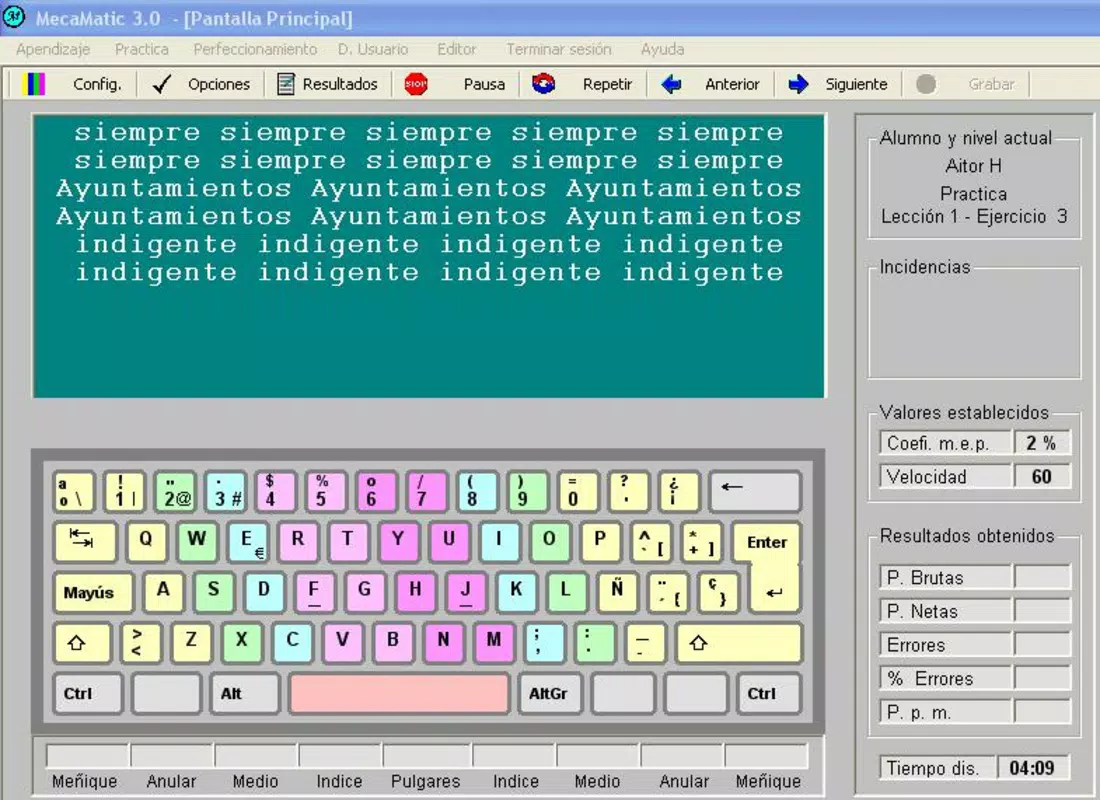
- Color-Coded Keyboard: Mecamatic employs a visual learning strategy by dividing the virtual keyboard into distinct color zones. Each key is assigned a color corresponding to a specific finger, helping users associate key positions with muscle memory. This method reduces the need to look at the keyboard during typing, promoting the development of touch typing skills over time.
- Extensive Exercise Library: The program includes over 300 structured exercises tailored to various proficiency levels. From beginner letter drills to advanced sentence and paragraph typing, the progression ensures continuous skill refinement. This breadth supports long-term engagement and allows users to maintain motivation through incremental challenges.
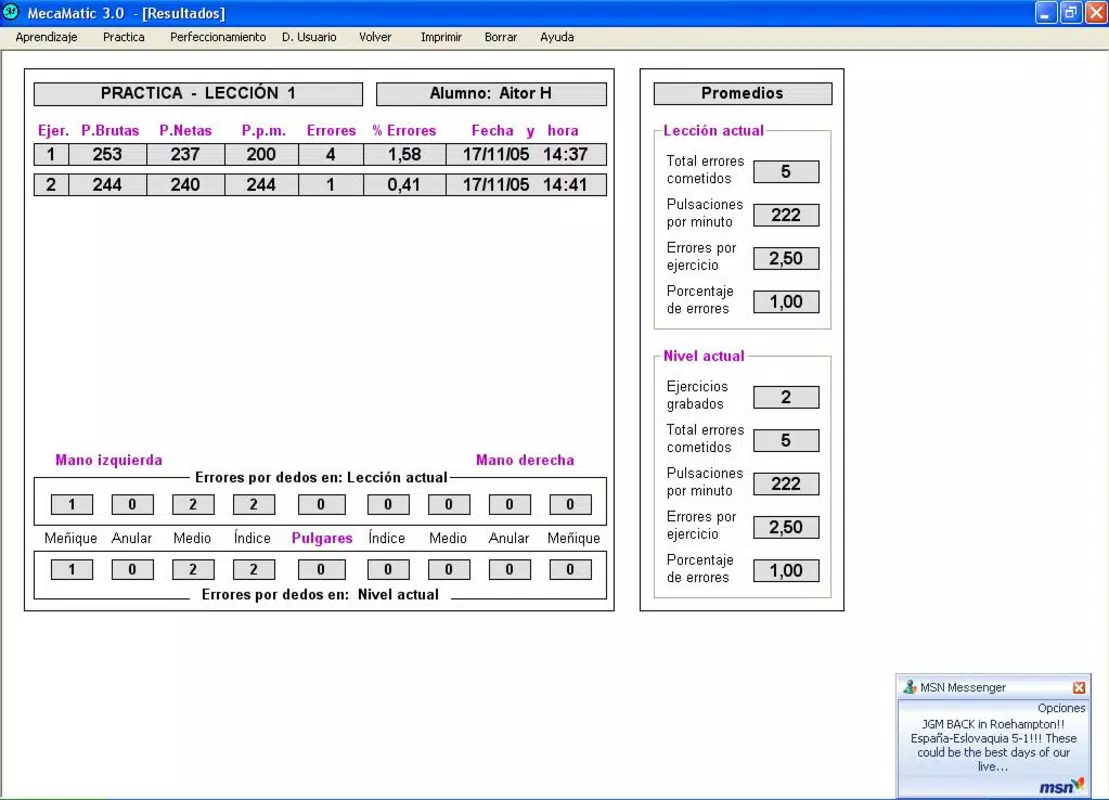
- User Tracking System: Mecamatic enables multiple user profiles, each with its own progress history and performance metrics. This feature is especially useful in shared environments such as homes, classrooms, or small offices where several individuals can track their individual improvement without interference.
- Gradual Difficulty Increase: As users advance, the application progressively hides the virtual keyboard, encouraging reliance on memory and tactile feedback. This adaptive difficulty curve supports confidence-building and reinforces the transition from guided practice to independent typing.
- User-Friendly Interface: The interface is designed for simplicity and clarity. Navigation is intuitive, with clear menus and minimal visual clutter. This ensures that users can focus on the learning process rather than navigating complex controls, making it accessible to both younger learners and adult beginners.
Interface, UX & Performance
The user interface of Mecamatic is clean and focused, emphasizing functionality over decorative elements. The layout centers around the virtual keyboard and the typing exercise area, ensuring that users remain engaged with the core activity. The visual design uses high-contrast colors and clear typography, enhancing readability and reducing eye strain during extended sessions.
Navigation is straightforward, with a logical flow between lessons, progress tracking, and settings. Users can easily switch between profiles, access exercise categories, and review performance data without unnecessary steps. Although the developer did not list formal performance metrics, the application’s lightweight file size of 12.6 MB suggests efficient resource usage, which may contribute to smooth operation on older or low-spec systems.
Responsiveness appears consistent across different screen resolutions, and the application maintains stability during prolonged use. The absence of reported crashes or freezes in publicly available records indicates a reliable execution pattern. While the developer did not specify compatibility with modern Windows versions, the app’s continued availability suggests ongoing support for current OS releases.
Platform Compatibility & Technical Requirements
Mecamatic is available exclusively for the Windows platform. The current version is 2.0.1, with a file size of 12.6 MB. This compact footprint makes it suitable for systems with limited storage space and older hardware configurations.
The developer did not specify minimum OS requirements or processor details. However, given its release date in 2011 and lightweight nature, it is likely compatible with Windows 7 and later versions. Compatibility with newer Windows iterations, such as Windows 11, cannot be confirmed without official documentation. Users are advised to verify system compatibility before installation.
Pros and Cons
Pros
- Effective color-coded system for visual learning and muscle memory development
- Over 300 exercises offer diverse, progressive learning paths
- Supports multiple user profiles with individual progress tracking
- Simple, distraction-free interface ideal for focused practice
- Lightweight file size ensures compatibility with older or low-resource systems
Cons
- Platform is limited to Windows; no support for macOS, iOS, or Android
- Developer did not disclose minimum OS or hardware requirements
- Limited availability of updates since the last release in 2011
- Interface design reflects its age, potentially lacking modern UI aesthetics
- Price point of $24.95 may be considered high for a standalone typing tutor without cloud sync or mobile access
FAQ
Is Mecamatic available for Android or iOS?
Mecamatic is designed exclusively for the Windows platform. There is no official version available for Android, iOS, or other mobile operating systems.
Can I use Mecamatic on Windows 11?
While the developer did not specify compatibility with Windows 11, the app’s lightweight design and long-standing presence suggest it may function on newer Windows versions. Users are encouraged to test the application in a safe environment before full deployment.
Is Mecamatic secure to download and install?
Based on publicly available records and distribution channels, Mecamatic is considered a legitimate software product. However, users should download from trusted sources to avoid potential risks associated with third-party APKs or modified versions.
Does Mecamatic support multiple users?
Yes, Mecamatic allows multiple user profiles, each with its own progress history and performance metrics. This feature is ideal for families, classrooms, or shared workspaces.
Are there regular updates for Mecamatic?
The last official release was in 2011, and no updates have been publicly announced since. While the app remains functional, users should be aware that it may not receive new features or security patches.
Final Thoughts
Mecamatic stands out as a durable and effective tool for anyone aiming to master touch typing. Its color-coded keyboard, extensive exercise library, and multi-user tracking system provide a comprehensive learning experience grounded in proven pedagogical principles. While the interface reflects its age and the lack of recent updates may raise concerns for some users, its core functionality remains robust and purpose-built.
For students, remote professionals, and individuals seeking to boost their digital efficiency, Mecamatic offers a focused, low-cost solution that delivers tangible results. Its affordability, especially when compared to modern subscription-based typing platforms, makes it a compelling choice for users who value stability and simplicity.
Despite its limitations in platform availability and update frequency, Mecamatic continues to serve as a reliable resource in the productivity toolkit. If you're looking to improve your typing speed and accuracy on Windows, this app remains a solid, no-frills option.
Download Mecamatic now


